RFID to Web Interface

This tutorial introduces a Processing interface sketch provides a GUI for the command-line interface written into the Arduino RFID example. You should read that tutorial first. The sketch shown here also allows you to upload tags it reads to O’Reilly’s Emerging Technology Conference attendee portal, and retrieves the resulting profile. The API for this was written by Edd Dumbill. The Processing sketch retrieves RFID tags from the Arduino reader serially, then  passes the tag via a HTTP request to a PHP script on a remote server, shown below,  that adds an authorized login to the O’Reilly site.

Caveat: this tutorial was written specifically for the RFID workshop at Etech 2009.  If you’re doing this on your own, the uploader won’t work because your tags won’t be associated with records in the O’Reilly database, and the PHP script that it calls probably won’t be active on my site anymore.  But you could build your own version on your own server. The PHP code that follows below gives you a start on that process, and the Processing code below can make a HTTP call to any web address you give it.

The entire sketch can be downloaded here:
rfid_uploader_0002

Continue reading “RFID to Web Interface”

Arduino-based RFID reader

This tutorial shows how to make an Arduino-based RFID reader that reads Mifare tags and stores them in EEPROM. It is a modification of Alex Zivanovic‘s code on Tinker.it. Thanks to Alex and Massimo Banzi for the reference. Once you’ve got it running, go on to the RFID to Web example, which provides a Processing interface sketch provides a GUI for the command-line interface written into the Arduino code.

The entire sketch can be downloaded here:

arduino_rfid_reader_0001

Continue reading “Arduino-based RFID reader”

Writing to Mifare RFID tags

Mifare RFID tags, like other RFID tags, contain a serial number that can be read using an RFID reader, but they also have a limited amount of memory space that you can write data to, and read back from.  This can be handy if you want to do something like keep a user’s account balance or name directly on the RFID tag.

This tutorial shows a number of the functions of my sonMicroReader  library for Processing, including how to write to the memory on tags.  It uses the same circuit as the SM130 reader example. The entire sketch can be downloaded here:

sonmicro_writer_0001

Continue reading “Writing to Mifare RFID tags”

Reading Mifare RFID Tags

This tutorial explains how to read from Mifare RFID tags from your computer using a Sonmicro SM130 read/write module. The sketch below is written in Processing using my SonmicroReader library. The SM130 has a TTL serial interface that you can connect to a micocontroller, or to a personal computer through a USB-to-serial interface.  Using the latter, it’s pretty simple to send serial commands to it and receive the data back. The entire Processing sketch can be downloaded here: rfid_simple_0001.

Continue reading “Reading Mifare RFID Tags”

RFID Reader and Image Display

This program reads ID Innovations ID-12 RFID readers and matches the tags against a list of known tags. It’s an illustration of how to use an RFID reader to associate data with a set of tags.

/*
  RFID Reader and image display
  Language: Processing
  
  This program reads ID Innovations ID-12 RFID readers rom two serial ports.
  It matches the tags against a list of known tags, and uses the match to 
  associate a name with the tag.  It also scans the sketch's data directory
  to load an image associated with the name.
  
  Created 12 Mar 2008
  by Tom Igoe and the interaction design class at AHO, Spring 2008
  directory reading and image scanning based on an example from Marius Watts

*/

Continue reading “RFID Reader and Image Display”

Reading Multiple Serial Ports in Processing

This program reads multiple serial ports and lets you know when data comes from one port or the other. The two ports in this example are attached to ID Innovations ID-12 RFID readers. The ID-12 readers send a string that ends with a byte whose value is 0x03.

/*
   Multiple Serial Ports
   Language: Processing

   This program reads multiple serial ports and lets you know when data comes 
   from one port or the other. The two ports in this example are attached to 
   ID Innovations ID-12 RFID readers. The ID-12 readers send a string that ends 
   with a byte whose value is 0x03.
   
   Created 12 Mar 2008
   by Tom Igoe
*/

Continue reading “Reading Multiple Serial Ports in Processing”

XBee Library graphing and logging application

Here’s a program that uses Rob Faludi and Dan Shiffman’s XBee library for processing to read three analog sensors from multiple remote XBee radios and graph them. It also saves the data to a comma-delimited file. It also makes sounds when the value exceeds a given threshold. For this application, you need two or more XBee series 1 radios. One is attached to the serial port of the computer, and the other is remote, broadcasting three analog values.

This also uses the ControlP5 library by Andreas Schlegel and the Ess library by Krister Olsson.

Continue reading “XBee Library graphing and logging application”

Sensor graphing with 3 lines of code!

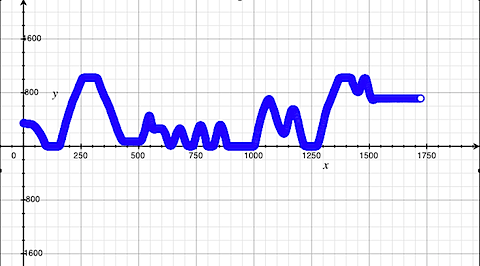
I’ve been looking for simple ways to graph the data from a sensor attached to a microcontroller lately, because it’s such a necessary activity if you want to look at sensor data over time. Using Apples Grapher program, which comes with OSX, I found a simple way that involves only four lines of code on an Arduino or Wiring microcontroller, and produces graphs like this:

graph.png

Continue reading “Sensor graphing with 3 lines of code!”

XOR calculation for NMEA checksums (GPS protocol)

If you’ve ever seen the serial output of a GPS reader, you’ve seen a mystery string at the end like this:

That’s the checksum of the whole string. NMEA data structure for Global Positioning (GPS) readers has a checksum on the end of each sentence. The checksum is the XOR of all the bytes between the $ and the * in the sentence. For example, if the sentence is this:

$GPRMC,155123.000,A,4043.8432,N,07359.7653,W,0.15,83.25,200407,,*28

then you run a checksum on this:

GPRMC,155123.000,A,4043.8432,N,07359.7653,W,0.15,83.25,200407,,

Here’s a Processing method to calculate the checksum, given the string between the $ and the *:

Technorati Tags: ,


Continue reading “XOR calculation for NMEA checksums (GPS protocol)”